Shopping Cart

Catalog of Modules for PrestaShop and Web Plugins
Convert inquiries into sales with a professional quote request system. Enable customers to request custom pricing directly from product pages or the cart. Manage internal messaging, offer exclusive discounts, and generate automated PDFs. The ultimate B2B tool for PrestaShop. 📄💼
Boost your custom sales and professionalize your negotiation with Maya Quote Pro! 🚀
In B2B sectors or exclusive product stores, the final price often depends on volume or specific needs. With the Maya Quote module, you eliminate purchase barriers by allowing your customers to request a formal quote with a single click.
Why choose Maya Quote Pro for your business?
Display Flexibility: Configure the "Request a Quote" button to appear only when out of stock, when the price is zero, or globally across the entire catalog.
Direct Negotiation System (Tickets): Includes a private message thread between the administrator and the customer for each quote. Resolve doubts and adjust details without leaving PrestaShop. 💬
Price and Discount Management: Adjust unit prices, apply percentage or fixed amount discounts, and manage specific shipping costs for each offer.
Document Automation: Automatically generate professional quotes in PDF format and send them as email attachments. 📄📧
Quote-to-Order Workflow: Once the customer accepts the quote, it can be converted into a real PrestaShop order respecting the agreed conditions.
Advanced Control Panel: Manage all requests from a centralized interface. Track statuses (Pending, Accepted, Rejected, Expired) and see when you last reviewed each request.
"My Account" Integration: Your customers will have a complete history of their requests where they can review offers, reply to messages, and accept quotes autonomously. 👤
Ideal for: Industrial companies, wholesale (B2B), consulting services, customizable products and stores handling high purchase volumes.
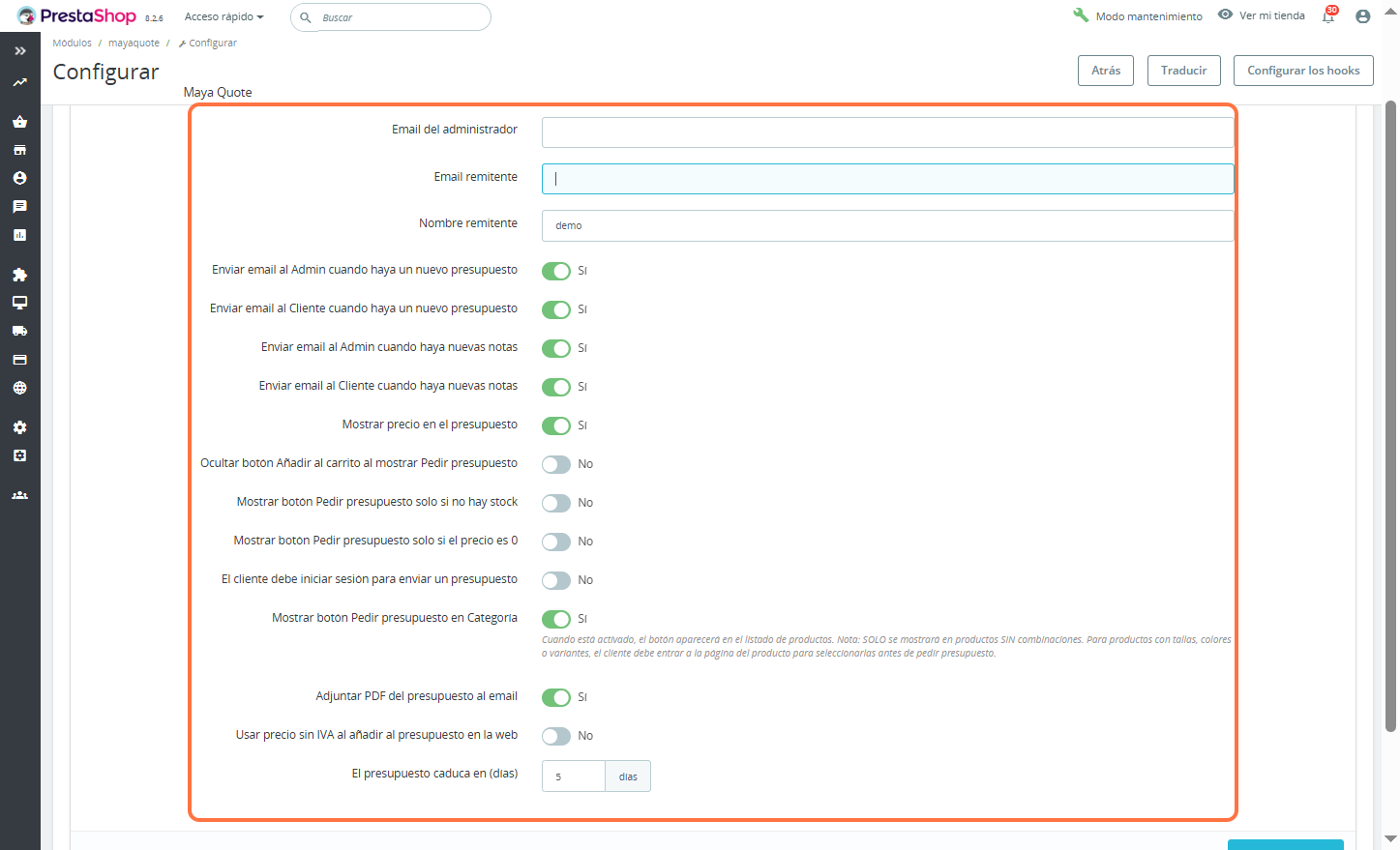
Basic communication channels are defined at the top:
Admin Email: Email where notifications of new requests will be received.
Sender Email: The address from which emails will be sent to customers.
Sender Name: The name that will appear in the customer's inbox (currently configured as "demo").
The module allows automating the information flow via toggles (Yes/No):
New Quote Alerts: Automatic email delivery to both the administrator and the customer when a request is generated.
Note Tracking: Immediate notification if there are comments or updates in the quote notes.
This section controls how the customer interacts with prices and products:
Show Price: Decides if the price is visible within the generated quote.
Cart Control: Option to hide the "Add to Cart" button when the quote button is active, avoiding confusion in the buying process.
Activation Conditionals: The quote button can be set to appear only if out of stock or only if the price is 0.
Privacy: Option to require the customer to log in before they can send a request.
Button in Category: Allows the "Request a Quote" button to appear directly in the product listing.
Important Note: According to the on-screen warning, this function only applies to products without combinations. For products with sizes or colors, the customer must enter the product page.
Attach PDF: Automatically generates and sends a detailed PDF document with the quote to the customer's email.
Tax Management: Option to use prices tax excluded when adding products to the quote on the web.
Expiry: Defines the legal or commercial validity period of the offer.
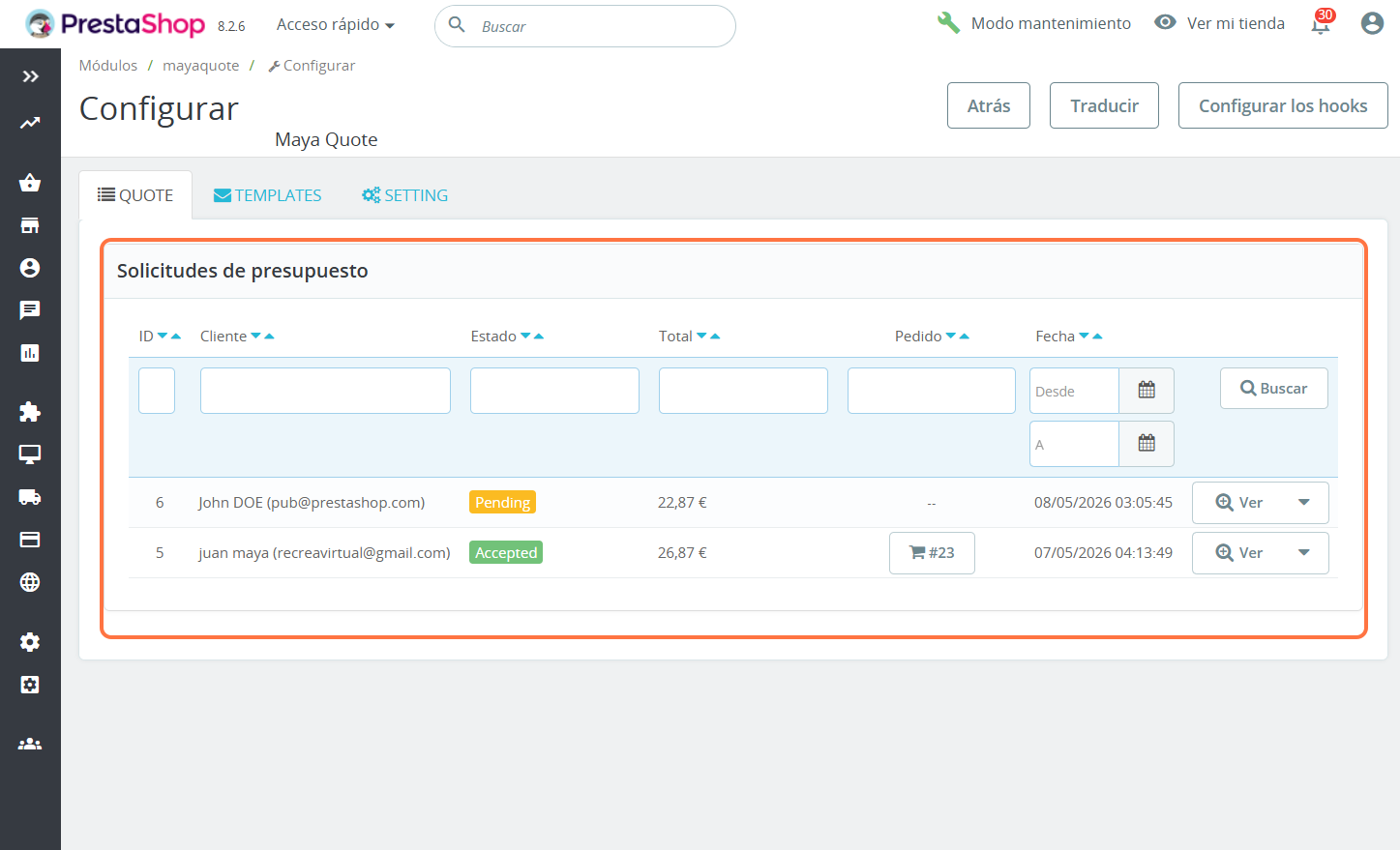
This section allows store administrators to view, filter, and process each request received in real-time. It is organized through a detailed list with the following functions:
The top of the table includes search fields to quickly locate any request by:
ID: Unique reference number.
Customer: Name or email.
Status: Filter by current status (Pending, Accepted, etc.).
Total: Quote price range.
Order: Reference of the linked order (if already converted into a sale).
Date Range: Calendar selector to search for requests in specific periods.
The panel uses color-coded labels to identify the progress of each quote, facilitating visual management:
Pending (Yellow): New requests requiring review or response from the administrator.
Accepted (Green): Quotes that have been approved by the customer.
One of the most powerful functions visible in the image is the direct link to the cart:
When a quote is accepted, the system automatically generates an Order ID (e.g., #23). This allows you to see which quotes have successfully converted into final sales without leaving the panel.
For each request line, the administrator has an actions menu on the right:
"View" Button: Opens the full details of the request (products, quantities, special prices, and customer notes).
Dropdown Menu: Allows additional actions such as editing, deleting, or sending updates to the customer.
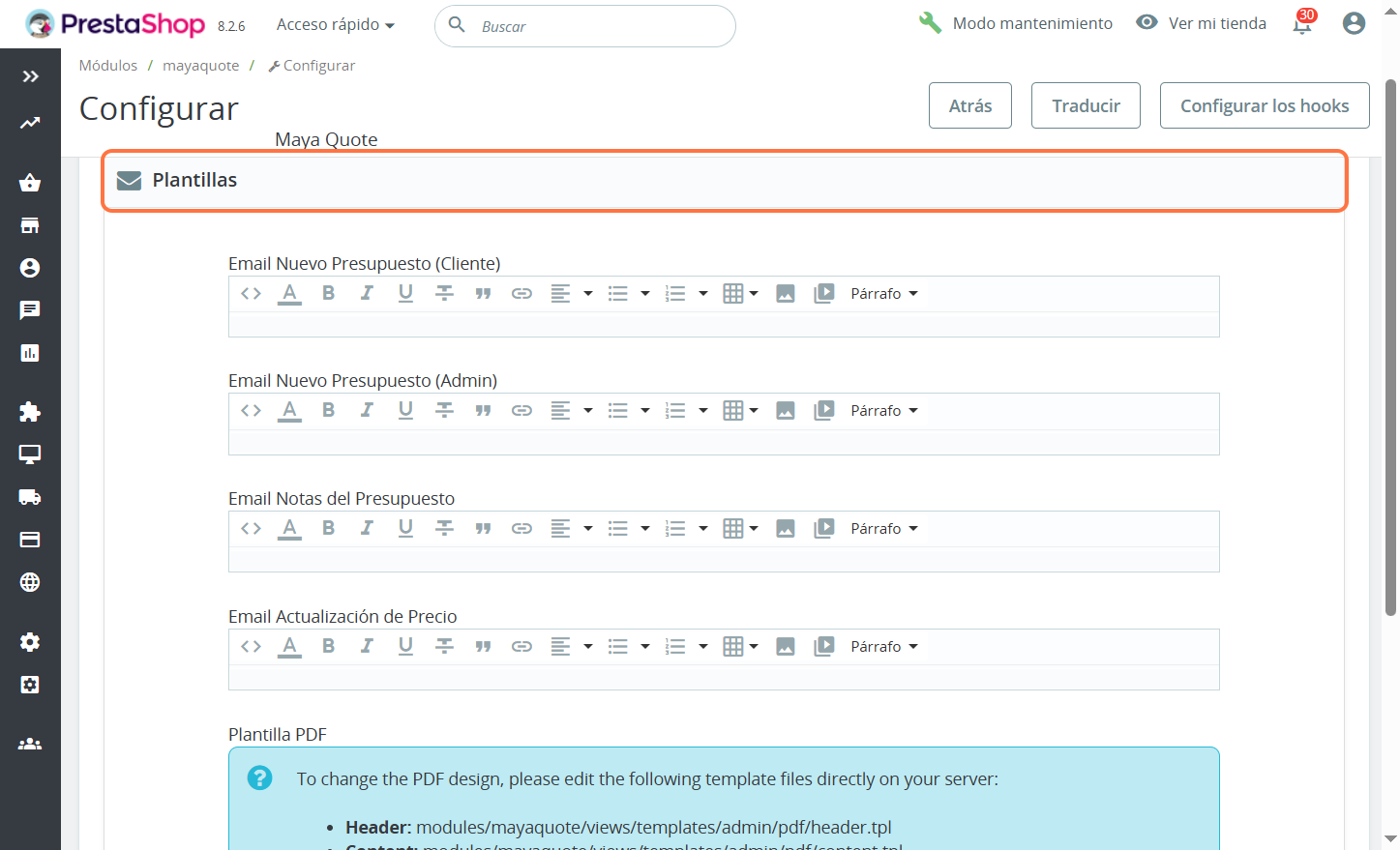
This section allows customizing the content of automatic emails and the design of the final quote. It is divided into two main areas:
The module offers rich text editors for different stages of the quote process. You can insert images, links, tables, and format the text visually or via HTML code:
New Quote Email (Customer): The confirmation message the user receives immediately after their request.
New Quote Email (Admin): The internal notification for the sales team with the details of the new opportunity.
Quote Notes Email: Used to send comments, clarifications, or specific follow-ups on an active request.
Price Update Email: The email triggered when the administrator adjusts costs or applies special discounts, notifying the customer of the change.
Unlike emails, the downloadable quote (PDF) offers a level of technical customization to ensure a professional finish:
Total Design Control: The panel indicates the specific paths on the server to edit the .tpl (Smarty) files.
Modular Structure: Allows independently modifying the Header (logo and fiscal data), the Content (products and prices table), and the Footer (legal conditions or acknowledgments).
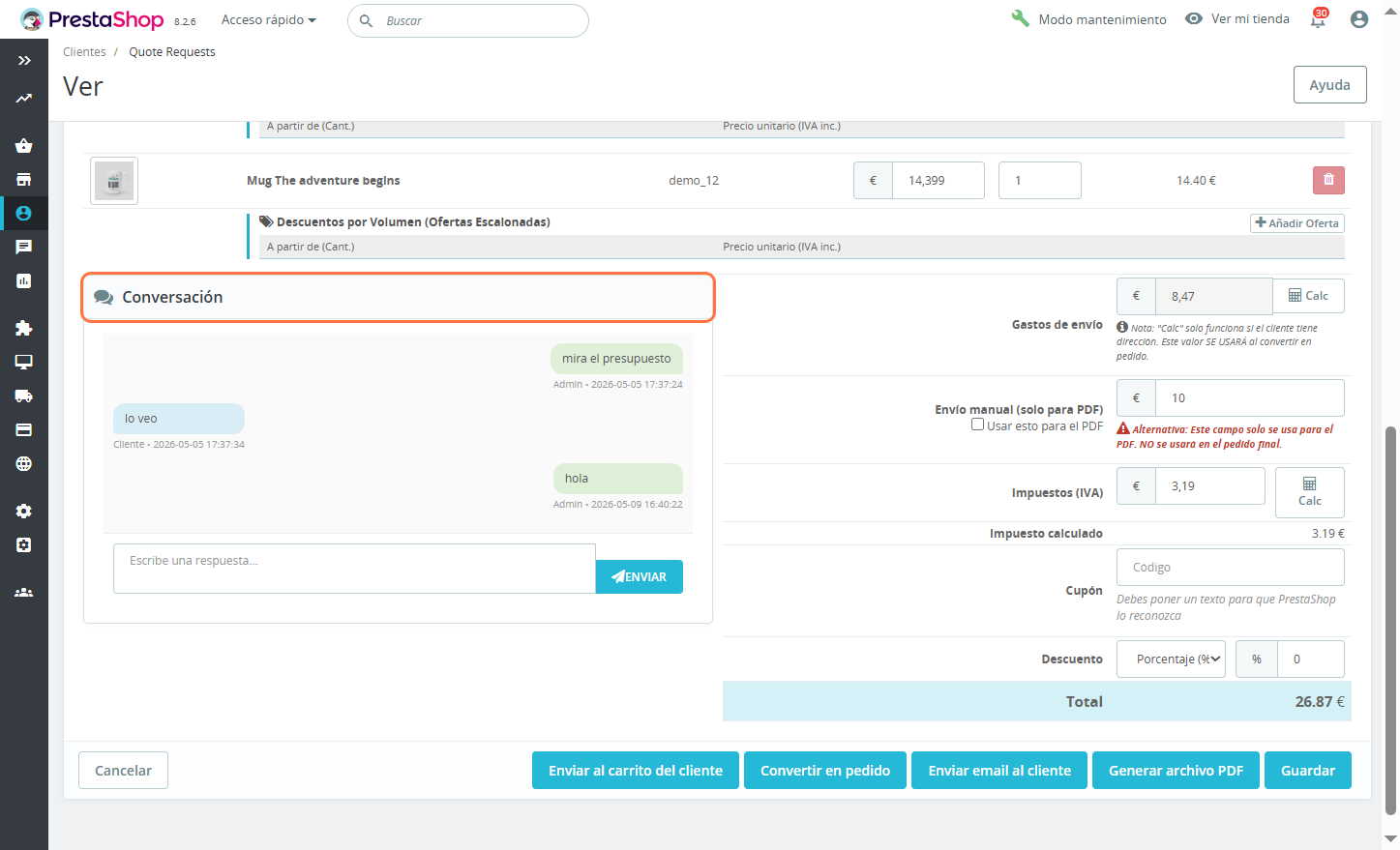
This view allows for integral management of every aspect of an individual request, from price editing to direct communication with the buyer.
Real-time Editing: The administrator can modify the unit price and quantities of the requested products.
Volume Discounts: Allows adding personalized "Tiered Offers" to incentivize larger purchases (e.g., reducing the price if the customer buys more units).
The box highlighted in orange shows a chat-style message history:
Allows fluid communication between the admin and the customer without leaving the panel.
The customer can resolve doubts and the admin can provide instructions or notices about changes in the quote, keeping all records in one place.
On the right, the module offers total control over final costs:
Shipping Costs: Automatic calculation based on the customer's address or manual entry.
Taxes (VAT): Integrated calculator to break down the tax correctly.
Coupons and Discounts: Option to apply promotional codes or direct discounts by percentage or fixed amount.
At the bottom are the options to finalize the process:
Send to Customer Cart: Loads the agreed products and prices directly into the user's session.
Convert to Order: Automatically creates a purchase order in PrestaShop with the quote data.
Generate PDF File: Creates the official document with the customized design seen previously.
Send Email to Customer: Formally notifies the user about the availability or update of their quote.
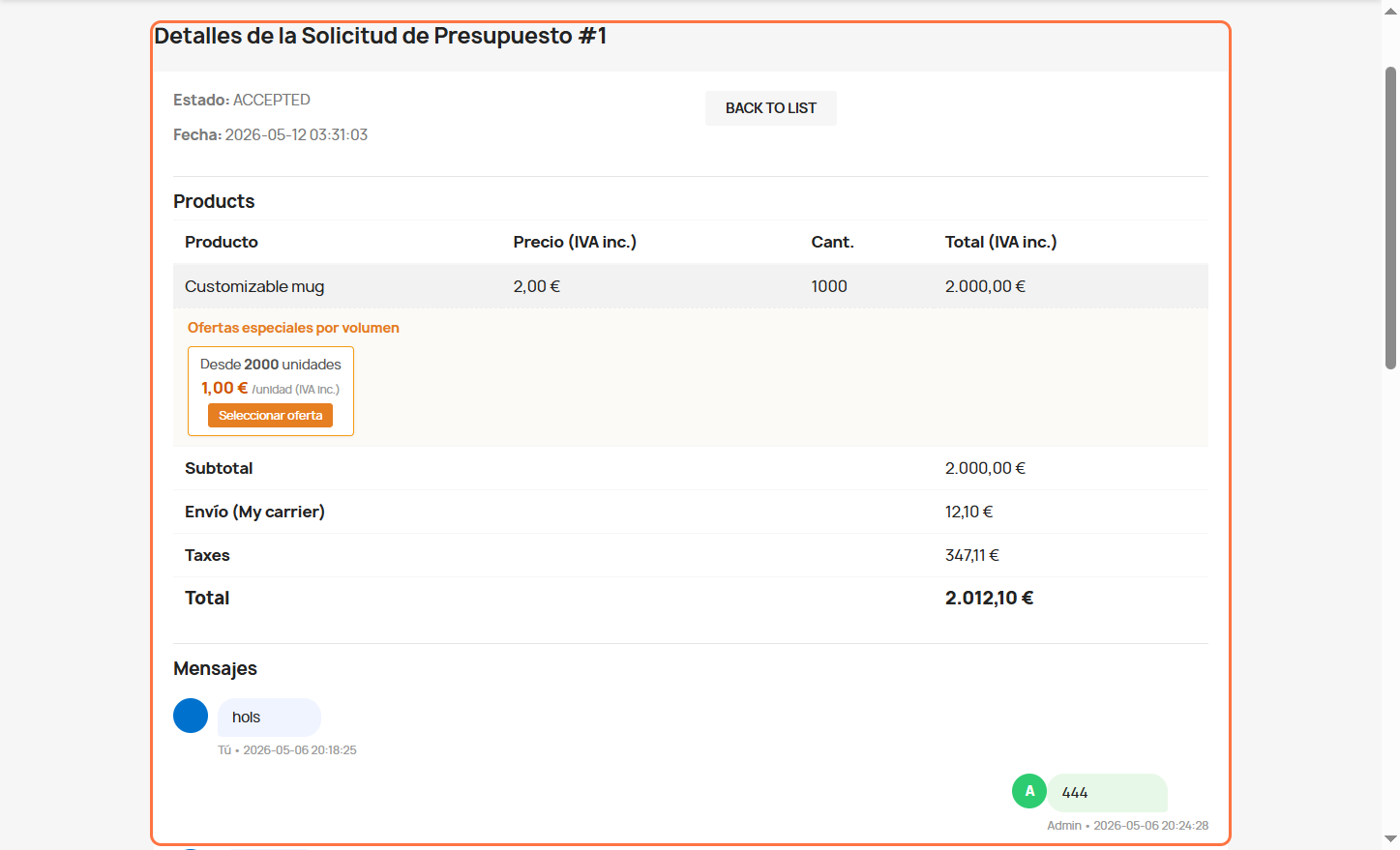
This is the screen the end-user sees when accessing their quotes. It is designed to be clear, professional, and to incentivize higher purchase volume through interactive features:
The customer clearly sees the Status (ACCEPTED) and the date of the request, maintaining full traceability of their petition.
A detailed breakdown is presented, including subtotal, shipping costs (based on the selected carrier), taxes, and the final total.
This is the star feature of this view to increase the average ticket:
Dynamic Incentive: The system automatically displays tiered offers configured by the admin (e.g., "From 2000 units at €1.00/unit").
"Select Offer" Button: Allows the customer to accept a higher volume offer with a single click, updating the quote instantly. It is a powerful passive negotiation tool for wholesale sales.
At the bottom, the customer has their own view of the conversation with the administrator.
This allows the customer to respond to the seller's questions or confirm customization details, centralizing all communication without the need for external channels like WhatsApp or emails that could get lost.
The breakdown of Taxes and the shipping method (My carrier) offer total transparency, generating trust and reducing friction when making the final purchase decision.

No questions yet. Be the first to ask a question!







Convert inquiries into sales with a professional quote request system. Enable customers to request custom pricing directly from product pages or the cart. Manage internal messaging, offer exclusive discounts, and generate automated PDFs. The ultimate B2B tool for PrestaShop. 📄💼